> ## Documentation Index
> Fetch the complete documentation index at: https://atmos.oxygen.wiki/llms.txt
> Use this file to discover all available pages before exploring further.
# About profiles
> Understand browser profiles — isolated browser identities with fingerprints, proxies, wallets, and browser settings
## What is a browser profile
A browser profile is a saved browser identity in Oxygen Atmos. Use profiles to separate accounts, sessions, proxies, wallets, fingerprints, cookies, local storage, extensions, bookmarks, and browser settings.
Oxygen Atmos stores and manages the profile configuration. [Oxidium](/browser-profiles/oxidium) is the Chromium-compatible browser core that opens when you launch a profile.
[Bookmarks](/browser-profiles/bookmarks-manager) can be assigned to every profile or routed to profile groups through tags.
 ## Profile table
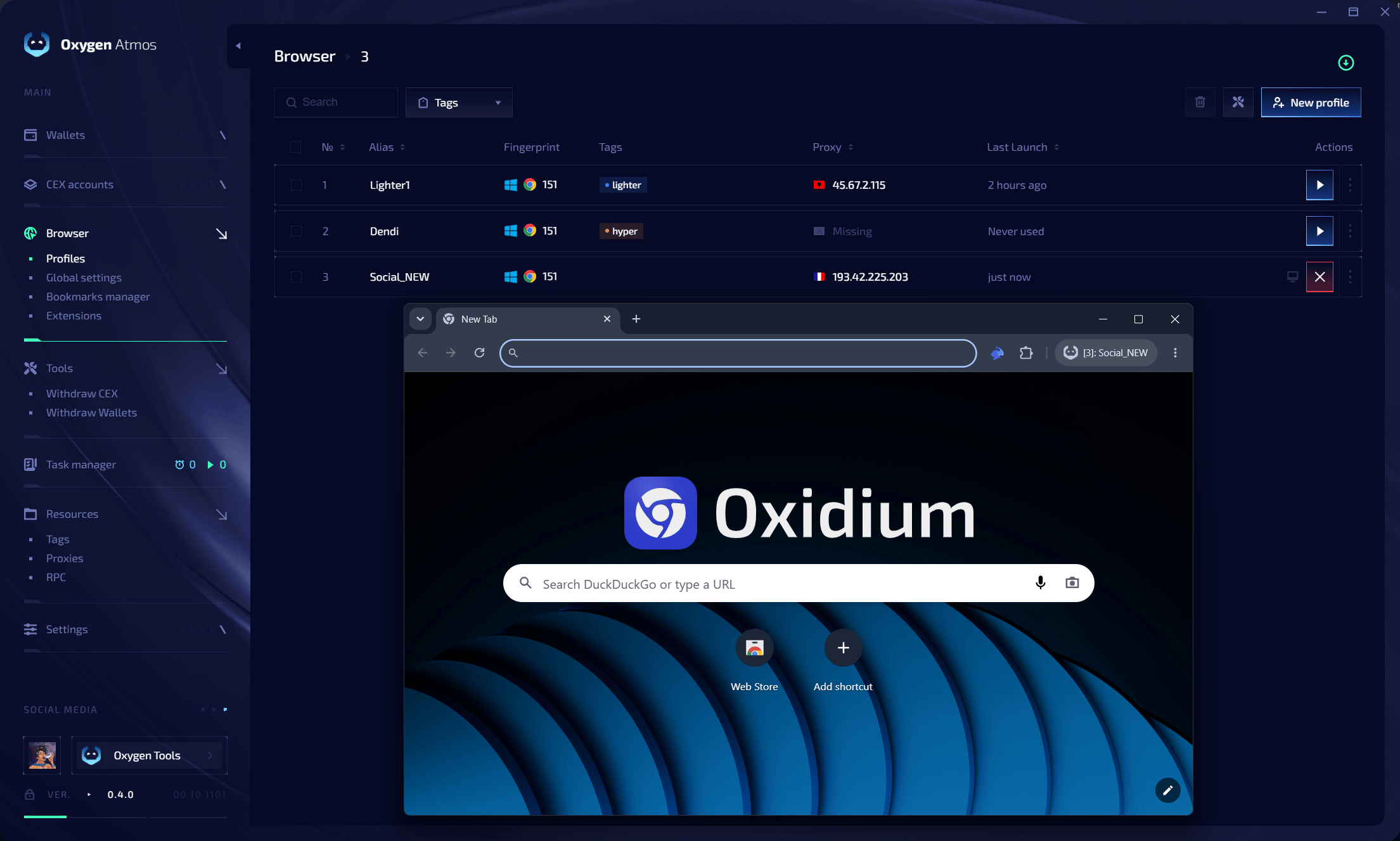
The Browser page shows the information you need for day-to-day work:
| Column | Description |
| --------------- | ------------------------------------------------- |
| **Alias** | Profile name shown in the table and browser label |
| **Fingerprint** | Browser version and fingerprint label |
| **Tags** | Tags used for filtering and extension routing |
| **Proxy** | Assigned proxy IP or missing proxy state |
| **Last launch** | Last time the profile was opened |
| **Actions** | Launch, focus, edit, and profile actions |
Use search to find profiles by alias, linked wallet address, browser version, fingerprint label, proxy URL, or proxy IP. Click a tag or use the **Tags** filter to show a specific profile group.
## Profile actions
Common actions include:
* launch a closed profile
* focus an already running profile
* close a running profile
* edit profile settings
* edit linked wallets
* edit tags
* edit proxy
* edit secure notes
* move a profile to the trash
Selected profiles can also be handled with bulk actions such as launch, close, tag editing, renaming, or deletion.
## Fingerprint components
Every profile uses a coherent set of browser parameters:
| Parameter | Description |
| ----------------------------- | ---------------------------------------------------------------------------------------------- |
| **Browser version** | [Oxidium](/browser-profiles/oxidium) version shown as a Chrome major version for compatibility |
| **User-Agent** | Browser and OS identification string |
| **Client Hints** | Chromium client hint headers and JavaScript values |
| **Screen resolution** | Display dimensions |
| **Platform** | OS platform identifier (e.g. Windows 10.0) |
| **Language** | Browser language and locale |
| **Timezone** | Geographic timezone setting |
| **Geolocation** | Permission mode and location source |
| **WebRTC** | Network exposure policy |
| **Canvas** | Canvas rendering noise |
| **Audio** | AudioContext noise |
| **Rectangles** | DOM rectangles noise |
| **WebGL** | GPU metadata and rendering behavior |
| **CPU / hardwareConcurrency** | Reported logical processor count aligned with the generated fingerprint |
Fingerprints are generated before the profile is saved. The preview reflects the selected browser version and browser preferences.
## Profile states
| State | Description |
| ------------ | -------------------------------------------------- |
| **Running** | Browser window is currently open (green indicator) |
| **Not used** | Browser is closed, data saved (gray indicator) |
## Creating a profile
Click the **New Profile** button in the top-right corner.
Enter an alias and select or create tags. Tags help filter profiles and can control which extensions load in the profile.
Select wallets if the profile should use wallet integration. The built-in Rabby extension provides the browser-side wallet interface.
Select the browser version. Enable **Keep up to date** when you want Oxygen Atmos to migrate the profile to one of the latest supported versions.
## Profile table
The Browser page shows the information you need for day-to-day work:
| Column | Description |
| --------------- | ------------------------------------------------- |
| **Alias** | Profile name shown in the table and browser label |
| **Fingerprint** | Browser version and fingerprint label |
| **Tags** | Tags used for filtering and extension routing |
| **Proxy** | Assigned proxy IP or missing proxy state |
| **Last launch** | Last time the profile was opened |
| **Actions** | Launch, focus, edit, and profile actions |
Use search to find profiles by alias, linked wallet address, browser version, fingerprint label, proxy URL, or proxy IP. Click a tag or use the **Tags** filter to show a specific profile group.
## Profile actions
Common actions include:
* launch a closed profile
* focus an already running profile
* close a running profile
* edit profile settings
* edit linked wallets
* edit tags
* edit proxy
* edit secure notes
* move a profile to the trash
Selected profiles can also be handled with bulk actions such as launch, close, tag editing, renaming, or deletion.
## Fingerprint components
Every profile uses a coherent set of browser parameters:
| Parameter | Description |
| ----------------------------- | ---------------------------------------------------------------------------------------------- |
| **Browser version** | [Oxidium](/browser-profiles/oxidium) version shown as a Chrome major version for compatibility |
| **User-Agent** | Browser and OS identification string |
| **Client Hints** | Chromium client hint headers and JavaScript values |
| **Screen resolution** | Display dimensions |
| **Platform** | OS platform identifier (e.g. Windows 10.0) |
| **Language** | Browser language and locale |
| **Timezone** | Geographic timezone setting |
| **Geolocation** | Permission mode and location source |
| **WebRTC** | Network exposure policy |
| **Canvas** | Canvas rendering noise |
| **Audio** | AudioContext noise |
| **Rectangles** | DOM rectangles noise |
| **WebGL** | GPU metadata and rendering behavior |
| **CPU / hardwareConcurrency** | Reported logical processor count aligned with the generated fingerprint |
Fingerprints are generated before the profile is saved. The preview reflects the selected browser version and browser preferences.
## Profile states
| State | Description |
| ------------ | -------------------------------------------------- |
| **Running** | Browser window is currently open (green indicator) |
| **Not used** | Browser is closed, data saved (gray indicator) |
## Creating a profile
Click the **New Profile** button in the top-right corner.
Enter an alias and select or create tags. Tags help filter profiles and can control which extensions load in the profile.
Select wallets if the profile should use wallet integration. The built-in Rabby extension provides the browser-side wallet interface.
Select the browser version. Enable **Keep up to date** when you want Oxygen Atmos to migrate the profile to one of the latest supported versions.
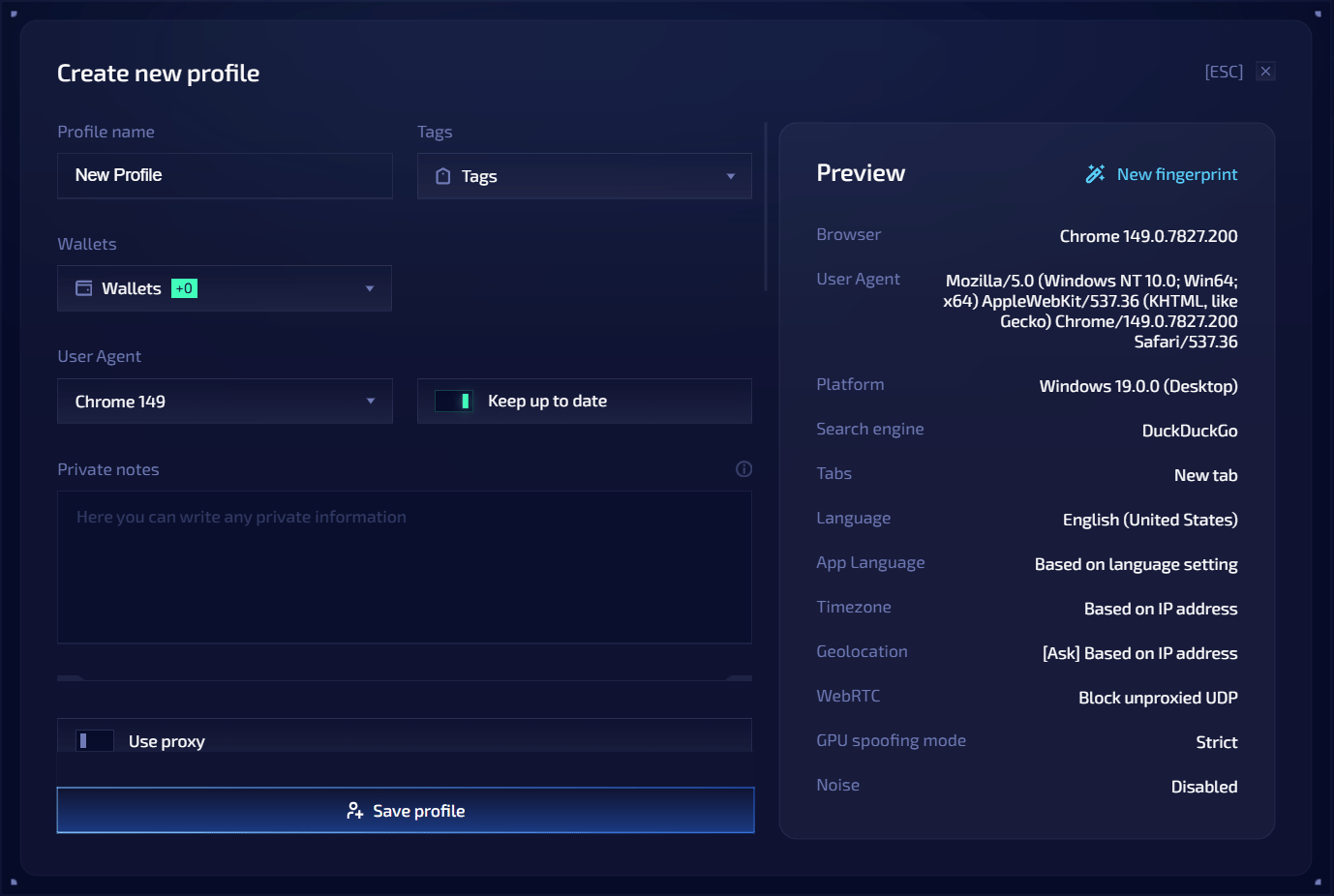 Review the generated fingerprint preview. It includes values such as user agent, platform, language, app language, timezone, geolocation, WebRTC, WebGL, and noise settings.
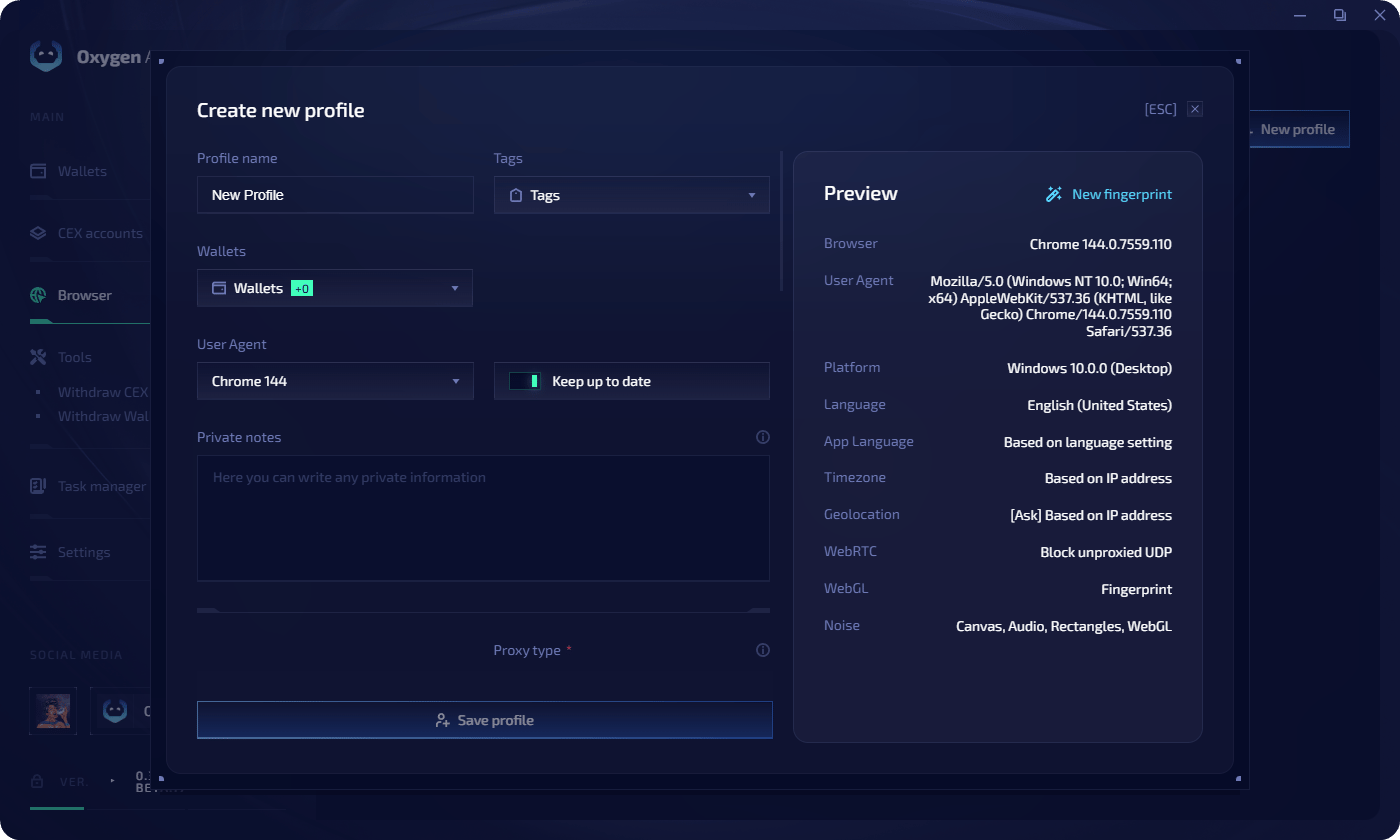 Enter proxy details if the profile needs a profile-specific network location. Supported types: **HTTP** and **SOCKS5**.
Proxy format:
```text theme={null}
protocol://host:port:user:pass
protocol://user:pass@host:port
```
When the proxy supports UDP, Oxygen Atmos can proxy WebRTC, QUIC, and HTTP/3 traffic. If UDP cannot be proxied, Oxygen Atmos blocks it instead of allowing a direct connection that could expose your real IP address.
Add cookies, X.com tokens, or Discord tokens if they should be applied on the next browser launch.
Use [global settings](/browser-profiles/global-settings) or override startup tabs, search engine, language, timezone, geolocation, WebRTC policy, GPU spoofing mode, or noise settings for this profile.
Enter proxy details if the profile needs a profile-specific network location. Supported types: **HTTP** and **SOCKS5**.
Proxy format:
```text theme={null}
protocol://host:port:user:pass
protocol://user:pass@host:port
```
When the proxy supports UDP, Oxygen Atmos can proxy WebRTC, QUIC, and HTTP/3 traffic. If UDP cannot be proxied, Oxygen Atmos blocks it instead of allowing a direct connection that could expose your real IP address.
Add cookies, X.com tokens, or Discord tokens if they should be applied on the next browser launch.
Use [global settings](/browser-profiles/global-settings) or override startup tabs, search engine, language, timezone, geolocation, WebRTC policy, GPU spoofing mode, or noise settings for this profile.
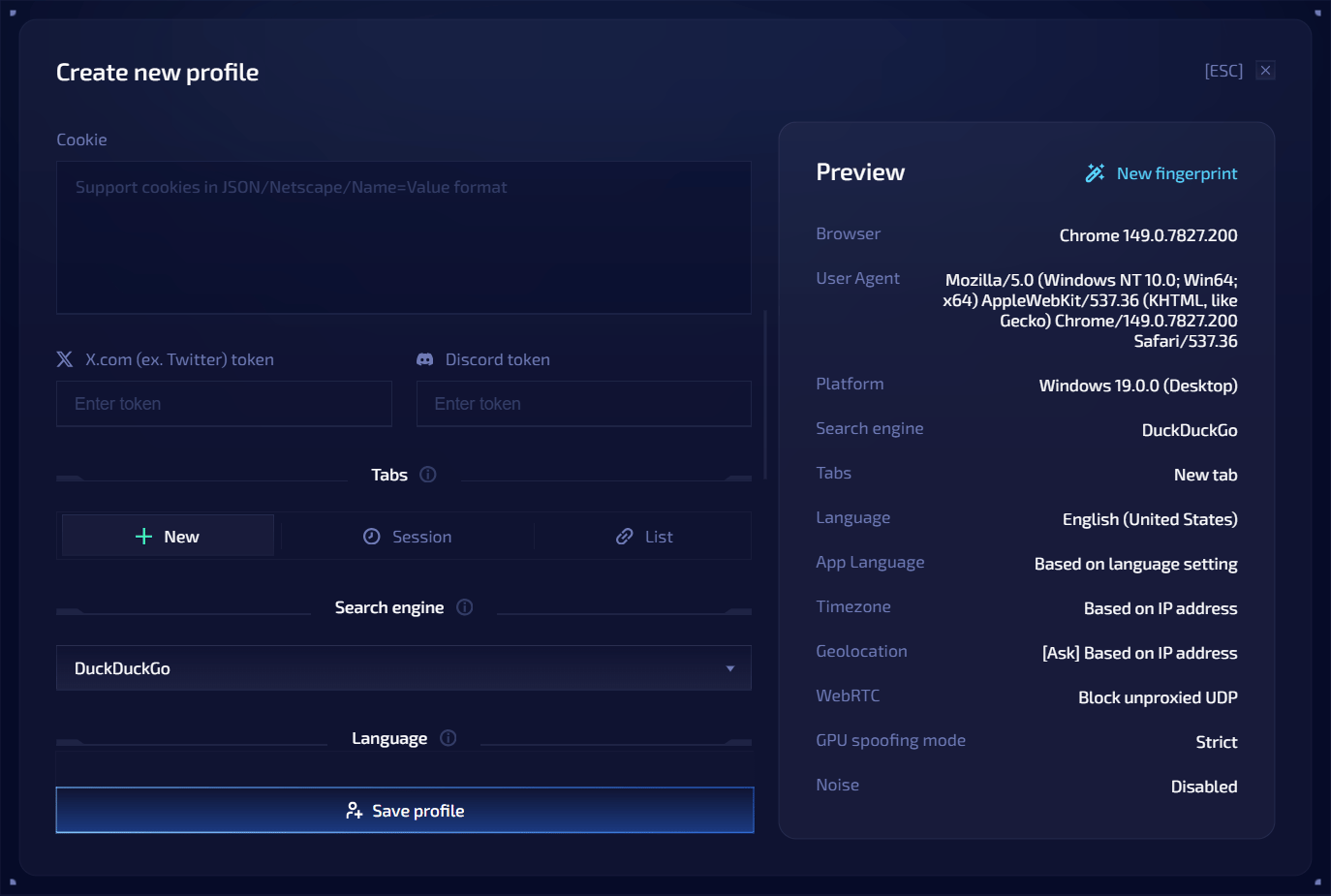
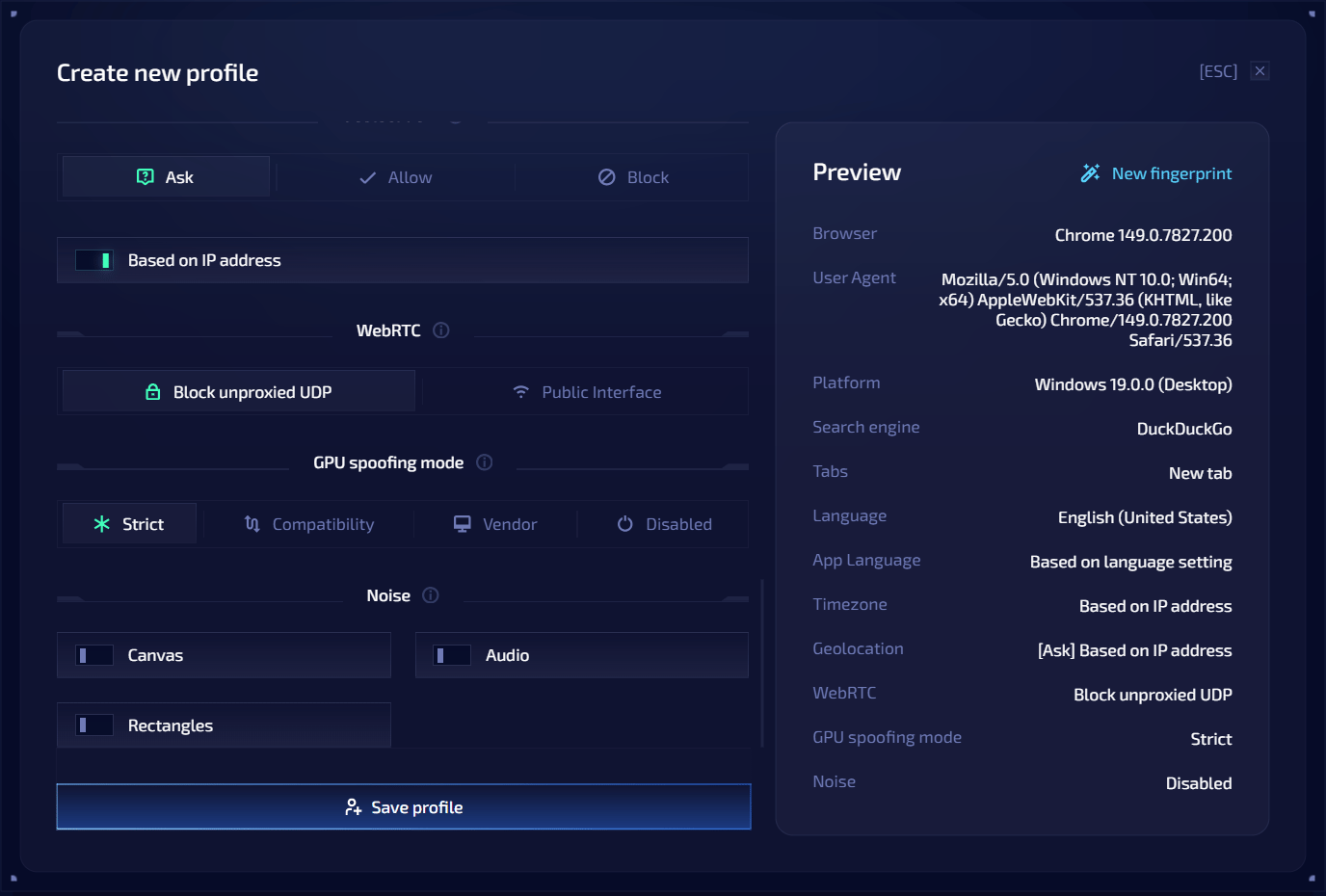 Click **Save profile**. Click the profile row to launch the browser.
## Editing a profile
You can edit profile settings after creation. Some changes apply to saved profile data immediately; runtime changes usually require closing and launching the profile again.
In edit mode, a browser version cannot be downgraded. You can keep the current version or select a newer supported version.
## Wallets in profiles
Each profile can have one main wallet per wallet type. The main wallet must exist in Oxygen Atmos, have a private key, and not already be used as the main wallet in another profile.
Profiles can also have additional wallets. An additional wallet requires a main wallet of the same wallet type. If the main wallet is removed, secondary wallets of that type are removed from the profile.
When the profile launches, linked wallets become available for wallet workflows in the browser profile. Private keys stay inside Oxygen Atmos and are not exposed to the browser runtime.
## Proxy settings
Each profile has its own proxy. Supported types: **HTTP** and **SOCKS5**.
To change a profile's proxy, open the profile editor and update the proxy fields.
When a proxy is configured, Oxygen Atmos checks whether it works and stores location data such as country and IP when available.
HTTP and SOCKS5 proxies can be used whether or not they provide UDP support. UDP-capable proxies can carry WebRTC, QUIC, and HTTP/3 traffic. With **Block unproxied UDP**, Oxygen Atmos blocks UDP that cannot be sent through the proxy, while TCP traffic continues to use the configured proxy.
## Trash and recovery
Deleting a browser profile moves it to the trash instead of removing it immediately. Open the trash to restore a profile or delete it permanently.
Click **Save profile**. Click the profile row to launch the browser.
## Editing a profile
You can edit profile settings after creation. Some changes apply to saved profile data immediately; runtime changes usually require closing and launching the profile again.
In edit mode, a browser version cannot be downgraded. You can keep the current version or select a newer supported version.
## Wallets in profiles
Each profile can have one main wallet per wallet type. The main wallet must exist in Oxygen Atmos, have a private key, and not already be used as the main wallet in another profile.
Profiles can also have additional wallets. An additional wallet requires a main wallet of the same wallet type. If the main wallet is removed, secondary wallets of that type are removed from the profile.
When the profile launches, linked wallets become available for wallet workflows in the browser profile. Private keys stay inside Oxygen Atmos and are not exposed to the browser runtime.
## Proxy settings
Each profile has its own proxy. Supported types: **HTTP** and **SOCKS5**.
To change a profile's proxy, open the profile editor and update the proxy fields.
When a proxy is configured, Oxygen Atmos checks whether it works and stores location data such as country and IP when available.
HTTP and SOCKS5 proxies can be used whether or not they provide UDP support. UDP-capable proxies can carry WebRTC, QUIC, and HTTP/3 traffic. With **Block unproxied UDP**, Oxygen Atmos blocks UDP that cannot be sent through the proxy, while TCP traffic continues to use the configured proxy.
## Trash and recovery
Deleting a browser profile moves it to the trash instead of removing it immediately. Open the trash to restore a profile or delete it permanently.
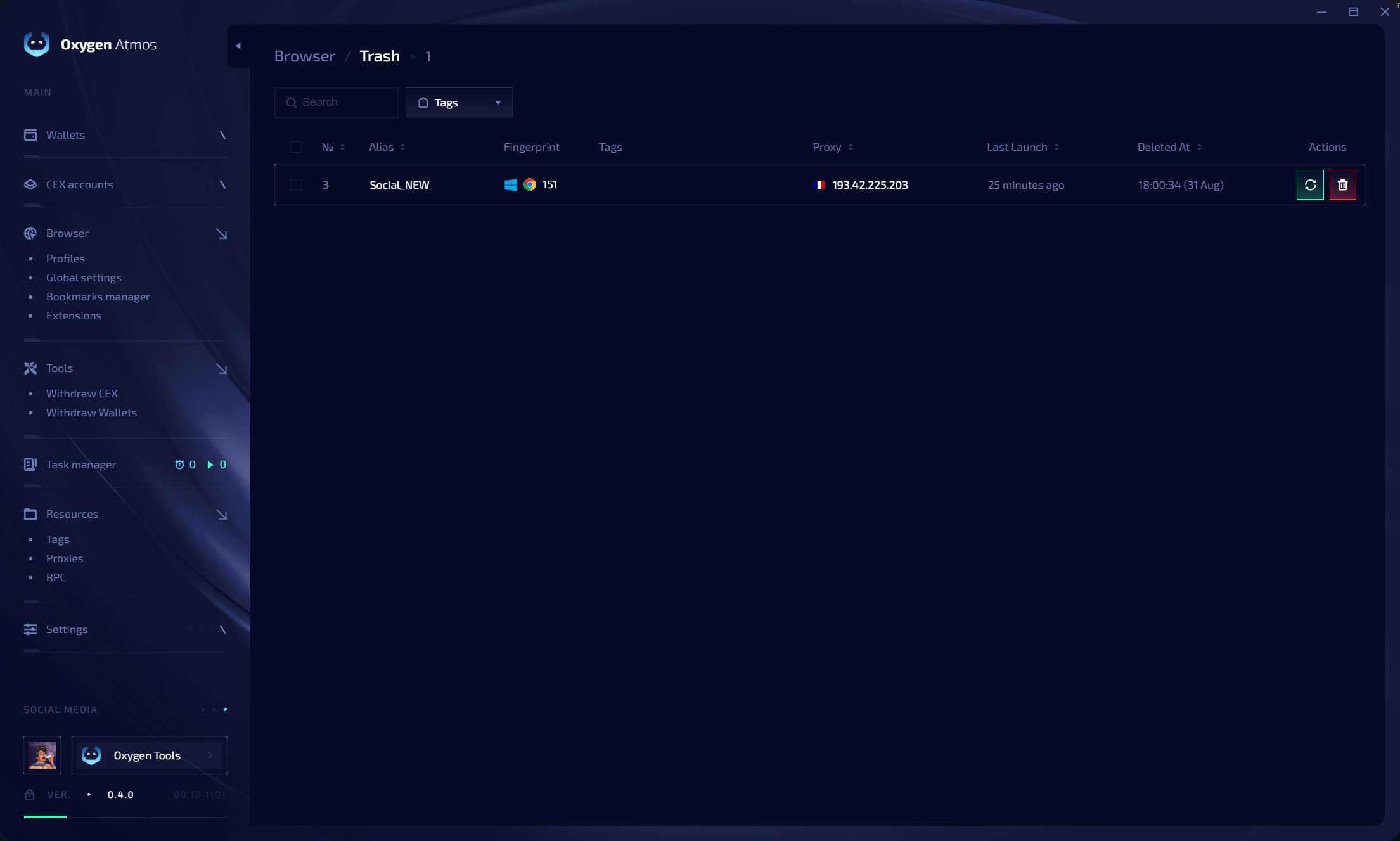 Permanent deletion cannot be undone. Restore a profile before permanently deleting it if you still need its cookies, sessions, fingerprint, or other local data.
## Membership limit
The number of usable profiles is tied to the limit in the current membership. Profiles above the membership limit are treated as excessive and cannot be used normally until the limit issue is resolved.
## Next steps
Create multiple profiles at once with bulk settings.
Add encrypted notes to profiles for quick reference.
Permanent deletion cannot be undone. Restore a profile before permanently deleting it if you still need its cookies, sessions, fingerprint, or other local data.
## Membership limit
The number of usable profiles is tied to the limit in the current membership. Profiles above the membership limit are treated as excessive and cannot be used normally until the limit issue is resolved.
## Next steps
Create multiple profiles at once with bulk settings.
Add encrypted notes to profiles for quick reference.