> ## Documentation Index
> Fetch the complete documentation index at: https://atmos.oxygen.wiki/llms.txt
> Use this file to discover all available pages before exploring further.
# Global settings
> Configure default tabs, locale, WebRTC, GPU spoofing, and noise for browser profiles
## Overview
Open **Browser → Global settings** to configure the defaults used when you create browser profiles. You can override these values for an individual profile in the profile editor.
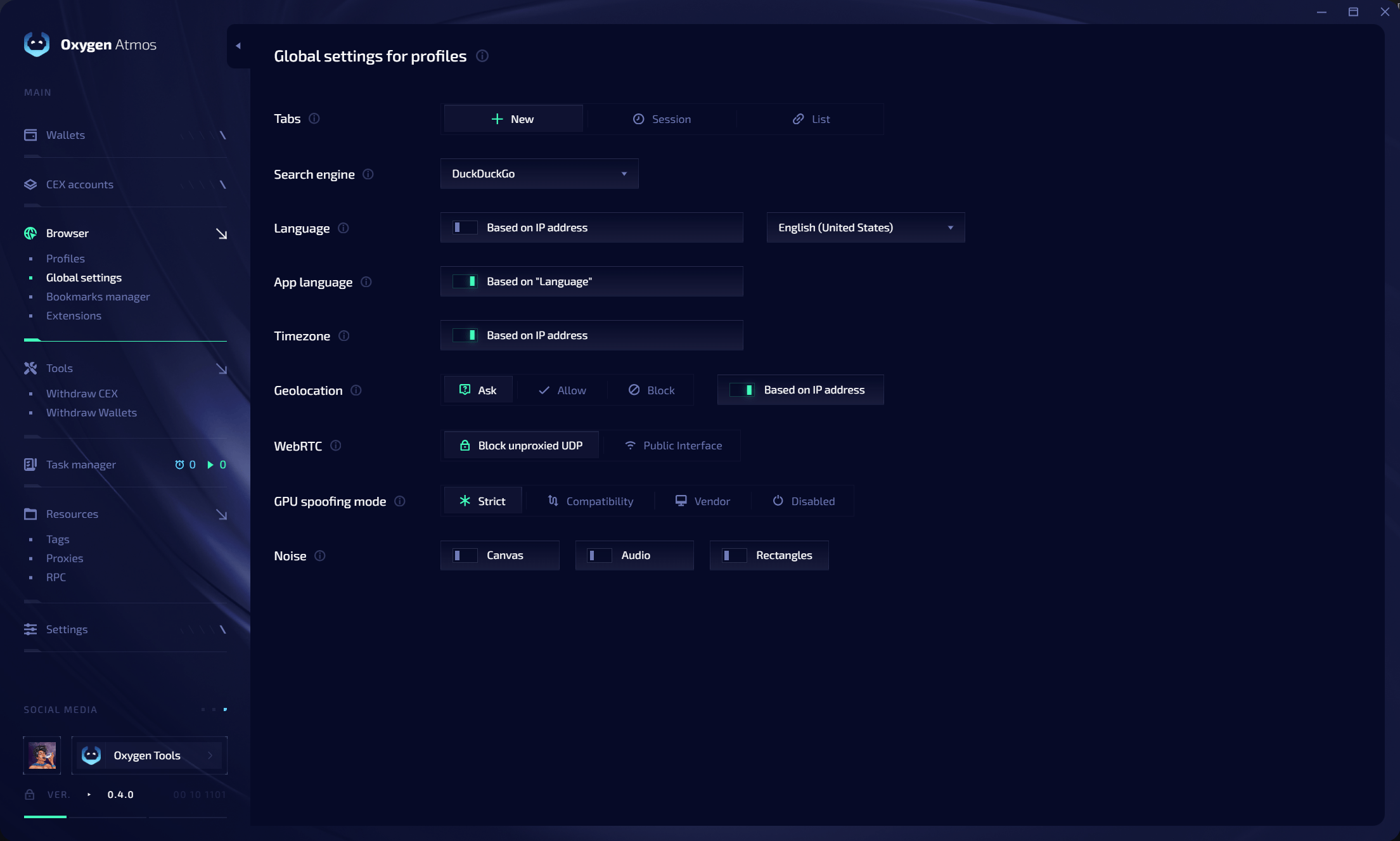 ## Startup tabs
Choose what opens when a profile starts:
| Mode | Behavior |
| ----------- | ------------------------------------------- |
| **New** | Open a new tab |
| **Session** | Restore tabs from the saved browser session |
| **List** | Open a configured list of URLs |
Use **List** when every new profile should open the same set of websites. You can select a different mode when creating or editing a profile.
## Locale and location
| Setting | Description |
| ----------------- | ---------------------------------------------------------------------------------------- |
| **Search engine** | Default search engine for profiles |
| **Language** | Use a selected browser language or derive it from the proxy IP address |
| **App language** | Follow **Language** or use a separate browser interface language |
| **Timezone** | Use the timezone detected from the proxy IP address or a selected value |
| **Geolocation** | Ask, allow, or block location access; location data can be based on the proxy IP address |
Keep language, timezone, geolocation, and proxy location aligned to maintain a coherent profile identity.
## WebRTC and UDP protection
The default **Block unproxied UDP** policy allows UDP traffic only when Oxygen Atmos can send it through the profile proxy. This applies to UDP-based traffic such as WebRTC, QUIC, and HTTP/3.
* If the proxy supports UDP, Oxygen Atmos sends supported UDP traffic through the proxy.
* If Oxygen Atmos cannot proxy the UDP traffic, it blocks that traffic instead of allowing a direct connection.
* Blocking direct UDP prevents websites from discovering the device's real IP address by bypassing the profile proxy.
* Proxies without UDP support remain usable for TCP traffic.
**Public Interface** may expose direct network interface information. Use **Block unproxied UDP** when preventing direct IP exposure is required.
## GPU spoofing
| Mode | Description |
| ----------------- | ------------------------------------------- |
| **Strict** | Apply the strongest GPU identity controls |
| **Compatibility** | Balance spoofing with website compatibility |
| **Vendor** | Preserve the selected GPU vendor identity |
| **Disabled** | Do not apply GPU spoofing |
## Noise
You can independently enable noise for:
* **Canvas**
* **Audio**
* **Rectangles**
The profile preview shows whether noise is enabled before you save the profile.
## Startup tabs
Choose what opens when a profile starts:
| Mode | Behavior |
| ----------- | ------------------------------------------- |
| **New** | Open a new tab |
| **Session** | Restore tabs from the saved browser session |
| **List** | Open a configured list of URLs |
Use **List** when every new profile should open the same set of websites. You can select a different mode when creating or editing a profile.
## Locale and location
| Setting | Description |
| ----------------- | ---------------------------------------------------------------------------------------- |
| **Search engine** | Default search engine for profiles |
| **Language** | Use a selected browser language or derive it from the proxy IP address |
| **App language** | Follow **Language** or use a separate browser interface language |
| **Timezone** | Use the timezone detected from the proxy IP address or a selected value |
| **Geolocation** | Ask, allow, or block location access; location data can be based on the proxy IP address |
Keep language, timezone, geolocation, and proxy location aligned to maintain a coherent profile identity.
## WebRTC and UDP protection
The default **Block unproxied UDP** policy allows UDP traffic only when Oxygen Atmos can send it through the profile proxy. This applies to UDP-based traffic such as WebRTC, QUIC, and HTTP/3.
* If the proxy supports UDP, Oxygen Atmos sends supported UDP traffic through the proxy.
* If Oxygen Atmos cannot proxy the UDP traffic, it blocks that traffic instead of allowing a direct connection.
* Blocking direct UDP prevents websites from discovering the device's real IP address by bypassing the profile proxy.
* Proxies without UDP support remain usable for TCP traffic.
**Public Interface** may expose direct network interface information. Use **Block unproxied UDP** when preventing direct IP exposure is required.
## GPU spoofing
| Mode | Description |
| ----------------- | ------------------------------------------- |
| **Strict** | Apply the strongest GPU identity controls |
| **Compatibility** | Balance spoofing with website compatibility |
| **Vendor** | Preserve the selected GPU vendor identity |
| **Disabled** | Do not apply GPU spoofing |
## Noise
You can independently enable noise for:
* **Canvas**
* **Audio**
* **Rectangles**
The profile preview shows whether noise is enabled before you save the profile.