> ## Documentation Index
> Fetch the complete documentation index at: https://atmos.oxygen.wiki/llms.txt
> Use this file to discover all available pages before exploring further.
# Globale Einstellungen
> Start-Tabs, Sprache, WebRTC, GPU-Spoofing und Noise für Browserprofile konfigurieren
## Übersicht
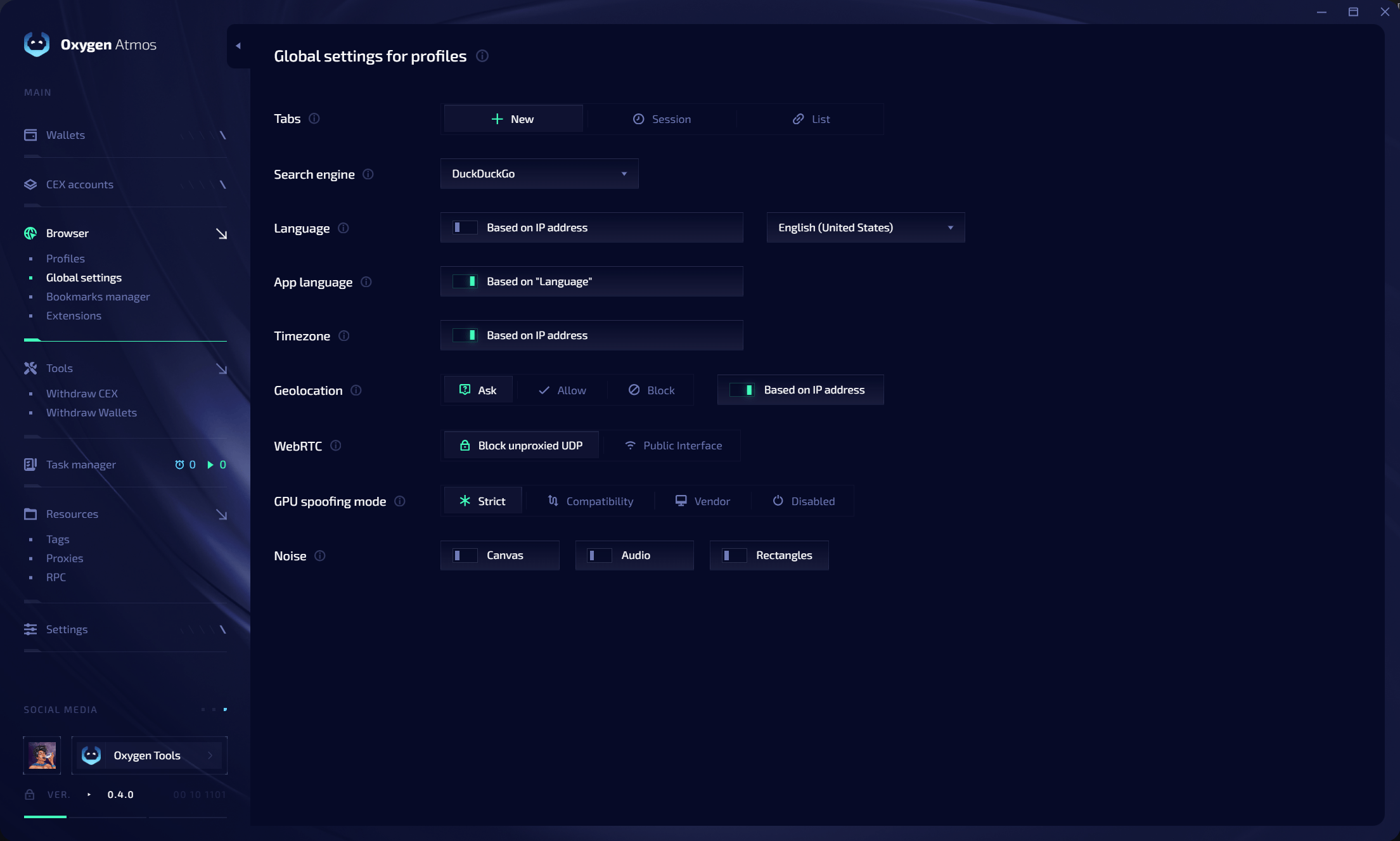
Öffnen Sie **Browser → Global settings**, um Standardwerte für neue Profile festzulegen. Diese Werte können pro Profil überschrieben werden.
 ## Start-Tabs
| Modus | Verhalten |
| ----------- | ----------------------------------------------- |
| **New** | Einen neuen Tab öffnen |
| **Session** | Tabs der gespeicherten Sitzung wiederherstellen |
| **List** | Eine konfigurierte URL-Liste öffnen |
## WebRTC und UDP-Schutz
**Block unproxied UDP** erlaubt UDP nur, wenn Atmos den Traffic über den Profil-Proxy senden kann.
* UDP-fähige Proxies übertragen WebRTC, QUIC und HTTP/3.
* Kann UDP nicht proxied werden, blockiert Atmos den Traffic.
* Eine direkte UDP-Verbindung kann den Profil-Proxy nicht umgehen und die echte IP nicht offenlegen.
* Proxies ohne UDP funktionieren weiterhin für TCP-Traffic.
**Public Interface** kann Informationen der direkten Netzwerkschnittstelle offenlegen.
## Weitere Einstellungen
Konfigurieren Sie Search engine, Language, App language, Timezone, Geolocation, GPU spoofing (**Strict**, **Compatibility**, **Vendor**, **Disabled**) und Noise für Canvas, Audio und Rectangles.
## Start-Tabs
| Modus | Verhalten |
| ----------- | ----------------------------------------------- |
| **New** | Einen neuen Tab öffnen |
| **Session** | Tabs der gespeicherten Sitzung wiederherstellen |
| **List** | Eine konfigurierte URL-Liste öffnen |
## WebRTC und UDP-Schutz
**Block unproxied UDP** erlaubt UDP nur, wenn Atmos den Traffic über den Profil-Proxy senden kann.
* UDP-fähige Proxies übertragen WebRTC, QUIC und HTTP/3.
* Kann UDP nicht proxied werden, blockiert Atmos den Traffic.
* Eine direkte UDP-Verbindung kann den Profil-Proxy nicht umgehen und die echte IP nicht offenlegen.
* Proxies ohne UDP funktionieren weiterhin für TCP-Traffic.
**Public Interface** kann Informationen der direkten Netzwerkschnittstelle offenlegen.
## Weitere Einstellungen
Konfigurieren Sie Search engine, Language, App language, Timezone, Geolocation, GPU spoofing (**Strict**, **Compatibility**, **Vendor**, **Disabled**) und Noise für Canvas, Audio und Rectangles.