> ## Documentation Index
> Fetch the complete documentation index at: https://atmos.oxygen.wiki/llms.txt
> Use this file to discover all available pages before exploring further.
# Über Exchange accounts
> CEX accounts per API verbinden, Balances prüfen und Withdrawals automatisieren
## Überblick
Exchange accounts speichern API-Verbindungen zu zentralisierten Börsen. Nach dem Verbinden können Sie Balances verfolgen und Exchanges als Quellen im [Transfer-Modul](/de/transfers/about-transfers) verwenden.
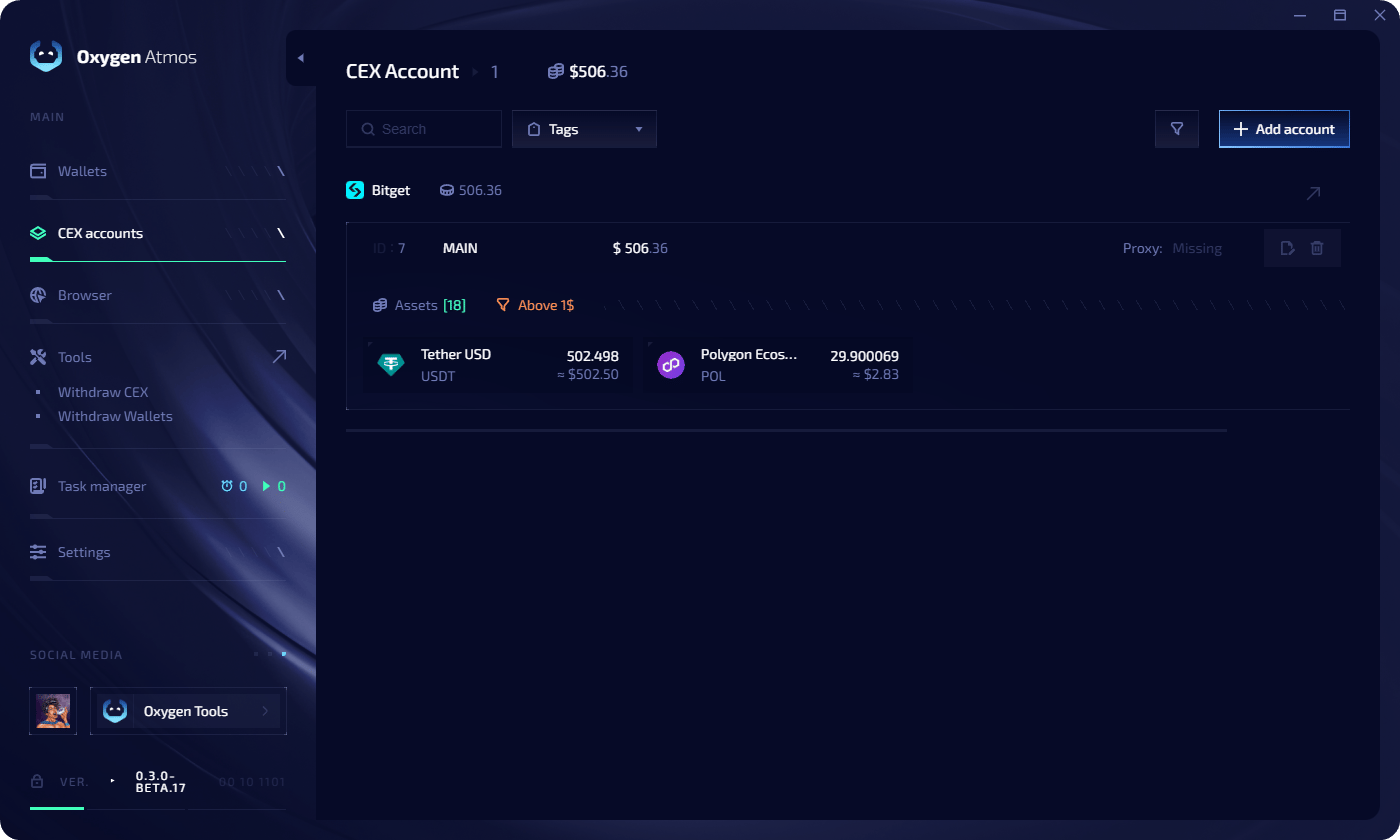 **Unterstützte Exchanges:** Binance, OKX, MEXC, Bitget
Oxygen Atmos zeigt nur Token-Balances, die **für withdrawal verfügbar** sind. Tokens in Futures, Staking oder Farming werden nicht einbezogen.
## Account limits
| Bedingung | Limit pro Exchange |
| ----------------------- | ------------------ |
| Weniger als 500 Profile | 1 Account |
| 500 oder mehr Profile | 5 Accounts |
## Exchange account hinzufügen
Erstellen Sie API keys in Ihrer Exchange. Details finden Sie unter [API key setup](/de/exchange-accounts/api-key-setup).
Öffnen Sie **CEX accounts** in der linken Seitenleiste.
Klicken Sie auf **Add Account** und wählen Sie Ihre Exchange.
**Unterstützte Exchanges:** Binance, OKX, MEXC, Bitget
Oxygen Atmos zeigt nur Token-Balances, die **für withdrawal verfügbar** sind. Tokens in Futures, Staking oder Farming werden nicht einbezogen.
## Account limits
| Bedingung | Limit pro Exchange |
| ----------------------- | ------------------ |
| Weniger als 500 Profile | 1 Account |
| 500 oder mehr Profile | 5 Accounts |
## Exchange account hinzufügen
Erstellen Sie API keys in Ihrer Exchange. Details finden Sie unter [API key setup](/de/exchange-accounts/api-key-setup).
Öffnen Sie **CEX accounts** in der linken Seitenleiste.
Klicken Sie auf **Add Account** und wählen Sie Ihre Exchange.
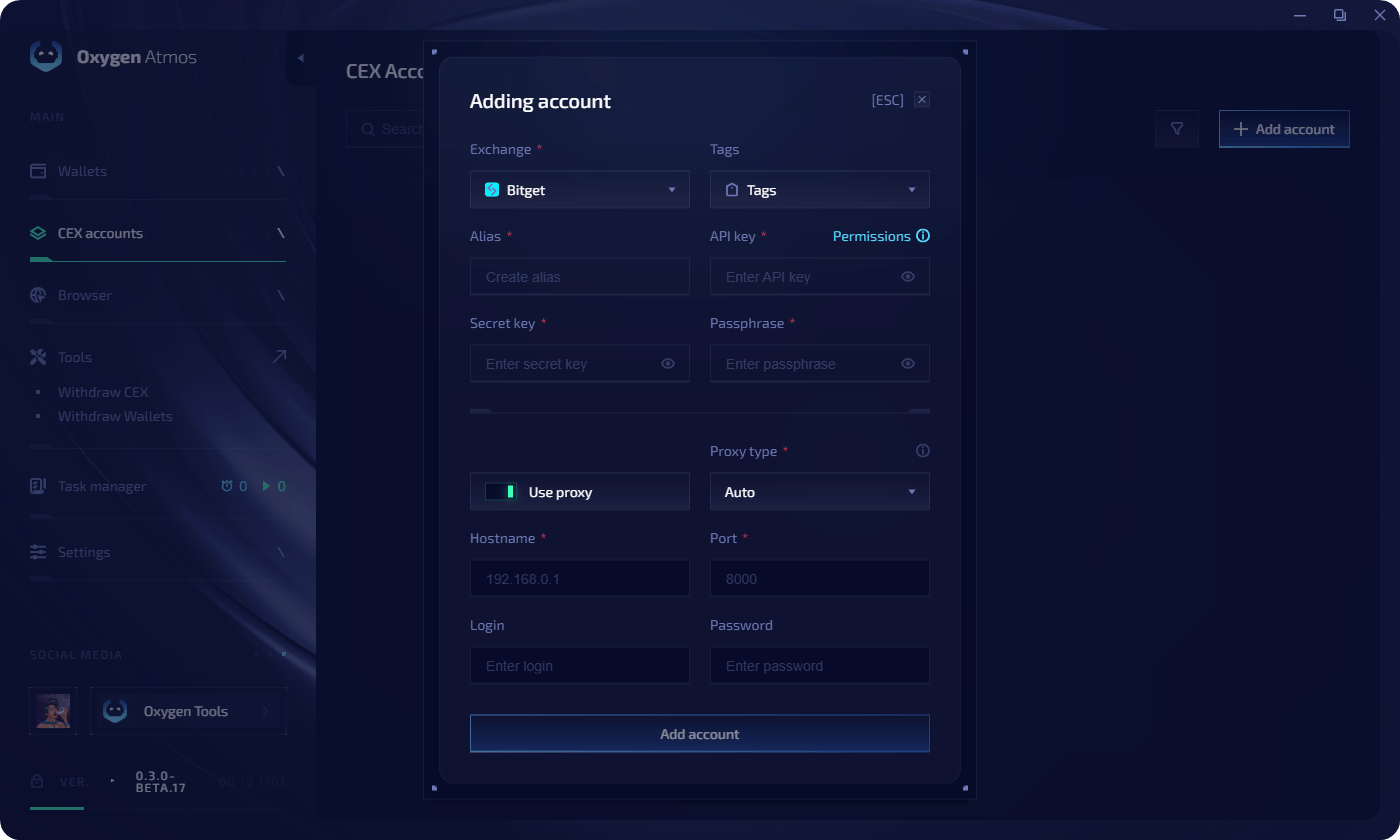 Füllen Sie die Felder aus:
| Feld | Beschreibung |
| -------------- | ------------------------------------------ |
| **Alias** | Anzeigename des Accounts |
| **API Key** | Ihr Exchange API key |
| **API Secret** | Ihr Exchange secret key |
| **Passphrase** | Nur für OKX und Bitget erforderlich |
| **Proxy** | Optional — proxy für API requests zuweisen |
Klicken Sie auf **Add Account**. Der Account erscheint mit aktuellen Balances in der Liste.
## API keys bearbeiten
Um credentials für einen verbundenen Account zu aktualisieren:
1. Klicken Sie auf die **edit icon** neben dem Exchange account
2. Aktualisieren Sie **alias**, **API key**, **secret key** oder **passphrase**
3. Klicken Sie auf **Save Changes**
## Schnellzugriff
Schritt-für-Schritt-Guides für Binance, OKX, MEXC und Bitget.
Tokens von Exchanges auf Ihre Wallets auszahlen.
Füllen Sie die Felder aus:
| Feld | Beschreibung |
| -------------- | ------------------------------------------ |
| **Alias** | Anzeigename des Accounts |
| **API Key** | Ihr Exchange API key |
| **API Secret** | Ihr Exchange secret key |
| **Passphrase** | Nur für OKX und Bitget erforderlich |
| **Proxy** | Optional — proxy für API requests zuweisen |
Klicken Sie auf **Add Account**. Der Account erscheint mit aktuellen Balances in der Liste.
## API keys bearbeiten
Um credentials für einen verbundenen Account zu aktualisieren:
1. Klicken Sie auf die **edit icon** neben dem Exchange account
2. Aktualisieren Sie **alias**, **API key**, **secret key** oder **passphrase**
3. Klicken Sie auf **Save Changes**
## Schnellzugriff
Schritt-für-Schritt-Guides für Binance, OKX, MEXC und Bitget.
Tokens von Exchanges auf Ihre Wallets auszahlen.