> ## Documentation Index
> Fetch the complete documentation index at: https://atmos.oxygen.wiki/llms.txt
> Use this file to discover all available pages before exploring further.
# Creating tasks
> Schedule tasks and configure withdrawal parameters before execution
## Create a scheduled task
Tasks are created from the [transfer module](/transfers/about-transfers) — either CEX withdrawal or wallet withdrawal.
Navigate to **Transfers** in the left sidebar and set up your withdrawal parameters.
Click **Preview** to review the operation.
Click **Postpone** instead of **Launch**.
Pick the **date and time** for execution.
Your device and Oxygen Atmos must remain running for the task to execute at the scheduled time.
The task appears in the **Scheduled** tab of the Task Manager.
## Edit a scheduled task
In the **Scheduled** tab, click **Open** on a task to view and edit it. Changes are saved automatically when you close the editor.
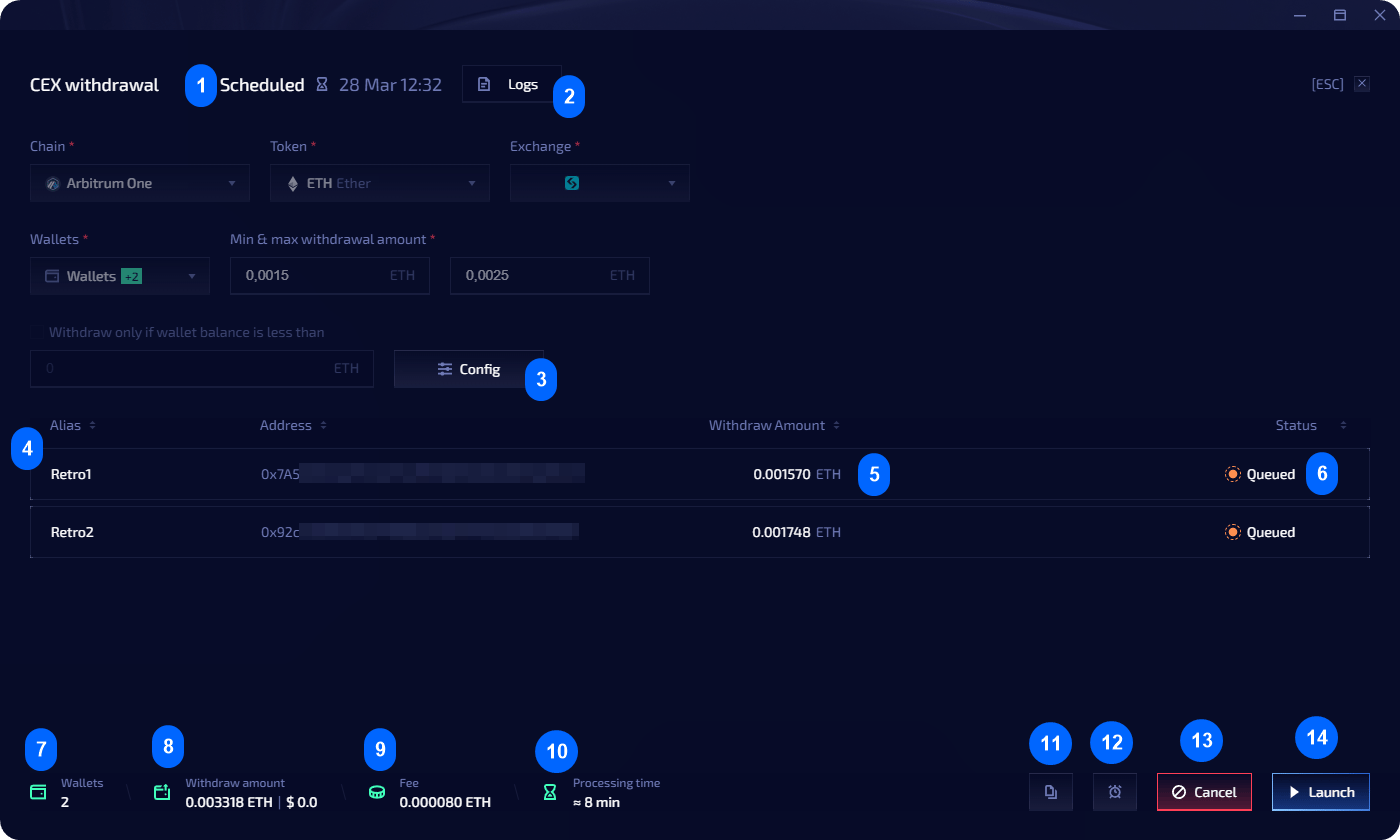 ## Editing menu reference
| # | Element | Description |
| -- | --------------------------- | -------------------------------------------------------------------------- |
| 1 | **Scheduled** | Date and time task will start execution |
| 2 | **Logs** | General task log |
| 3 | **Config** | Workers, delays, retries (not editable on running tasks) |
| 4 | **Action row** | Info about the action for a specific wallet |
| 5 | **Token withdrawal amount** | Amount to be withdrawn to wallet (not editable on running tasks) |
| 6 | **Status** | Current action status |
| 7 | **Wallets** | Progress by completed wallets |
| 8 | **Withdrawal amount** | Total withdrawal amount across all wallets |
| 9 | **Fee** | Total fee across all wallets |
| 10 | **Processing time** | Total time for completion |
| 11 | **Use as template** | Copy menu — use as template, copy all wallets, or copy wallets with errors |
| 12 | **Postpone** | Change scheduled date and time |
| 13 | **Cancel** | Cancel the task |
| 14 | **Launch** | Start execution immediately |
## Editing menu reference
| # | Element | Description |
| -- | --------------------------- | -------------------------------------------------------------------------- |
| 1 | **Scheduled** | Date and time task will start execution |
| 2 | **Logs** | General task log |
| 3 | **Config** | Workers, delays, retries (not editable on running tasks) |
| 4 | **Action row** | Info about the action for a specific wallet |
| 5 | **Token withdrawal amount** | Amount to be withdrawn to wallet (not editable on running tasks) |
| 6 | **Status** | Current action status |
| 7 | **Wallets** | Progress by completed wallets |
| 8 | **Withdrawal amount** | Total withdrawal amount across all wallets |
| 9 | **Fee** | Total fee across all wallets |
| 10 | **Processing time** | Total time for completion |
| 11 | **Use as template** | Copy menu — use as template, copy all wallets, or copy wallets with errors |
| 12 | **Postpone** | Change scheduled date and time |
| 13 | **Cancel** | Cancel the task |
| 14 | **Launch** | Start execution immediately |