> ## Documentation Index
> Fetch the complete documentation index at: https://atmos.oxygen.wiki/llms.txt
> Use this file to discover all available pages before exploring further.
# CEX withdrawal
> Withdraw tokens from exchange accounts to your wallets automatically
## Overview
CEX withdrawal lets you automatically send tokens from connected exchange accounts directly to wallets in your manager. Ideal for distributing funds across hundreds of wallets without manual work.
## Parameters
| Parameter | Description |
| ------------------------------------------------ | ------------------------------------------------------------ |
| **Chain** | Blockchain network for the withdrawal (e.g. BNB Smart Chain) |
| **Token** | Token to withdraw (e.g. USDT) |
| **Exchange** | Source exchange account |
| **Wallets** | Destination wallets — click to pick from your wallet list |
| **Withdrawal amount** | Min and max amount range in the selected token |
| **Withdraw only if wallet balance is less than** | Toggle — only send to wallets with defined balance |
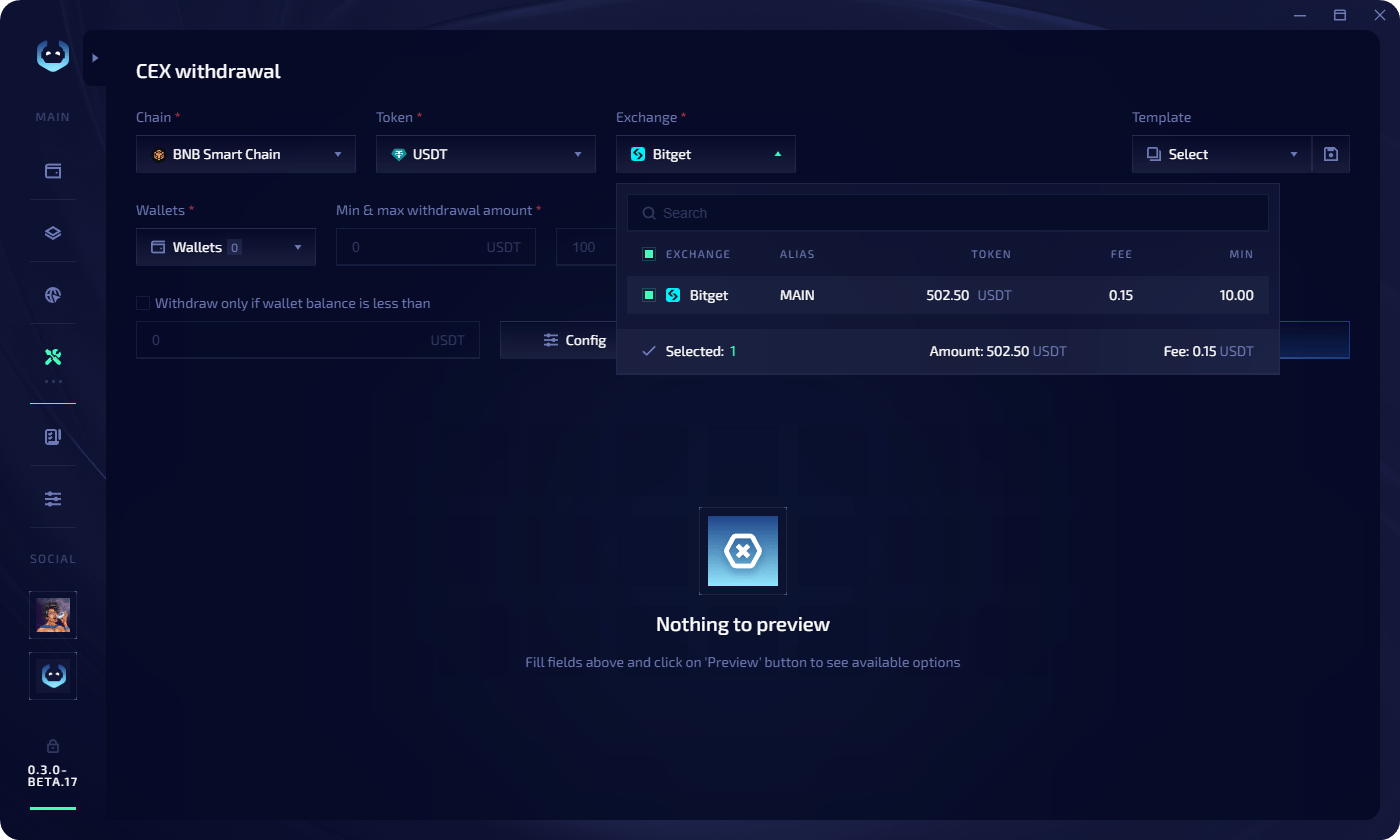 For each selected exchange, you can view the current token balance, withdrawal fee, and minimum withdrawal amount.
## Task config
Before launching, configure the execution settings:
| Setting | Description |
| ----------------------------- | ----------------------------------------------- |
| **Workers** | Number of parallel withdrawal threads |
| **Max retries** | How many times to retry a failed withdrawal |
| **Delay between withdrawals** | Min and max delay in seconds between operations |
## Execute a withdrawal
Add exchange API keys in [CEX accounts](/exchange-accounts/about-exchange-accounts).
Set the chain, token, exchange, wallets, and amount range.
Click **Preview**. Review the list of wallets with their withdrawal amounts, current balances, and fees. You can edit individual amounts if needed.
For each selected exchange, you can view the current token balance, withdrawal fee, and minimum withdrawal amount.
## Task config
Before launching, configure the execution settings:
| Setting | Description |
| ----------------------------- | ----------------------------------------------- |
| **Workers** | Number of parallel withdrawal threads |
| **Max retries** | How many times to retry a failed withdrawal |
| **Delay between withdrawals** | Min and max delay in seconds between operations |
## Execute a withdrawal
Add exchange API keys in [CEX accounts](/exchange-accounts/about-exchange-accounts).
Set the chain, token, exchange, wallets, and amount range.
Click **Preview**. Review the list of wallets with their withdrawal amounts, current balances, and fees. You can edit individual amounts if needed.
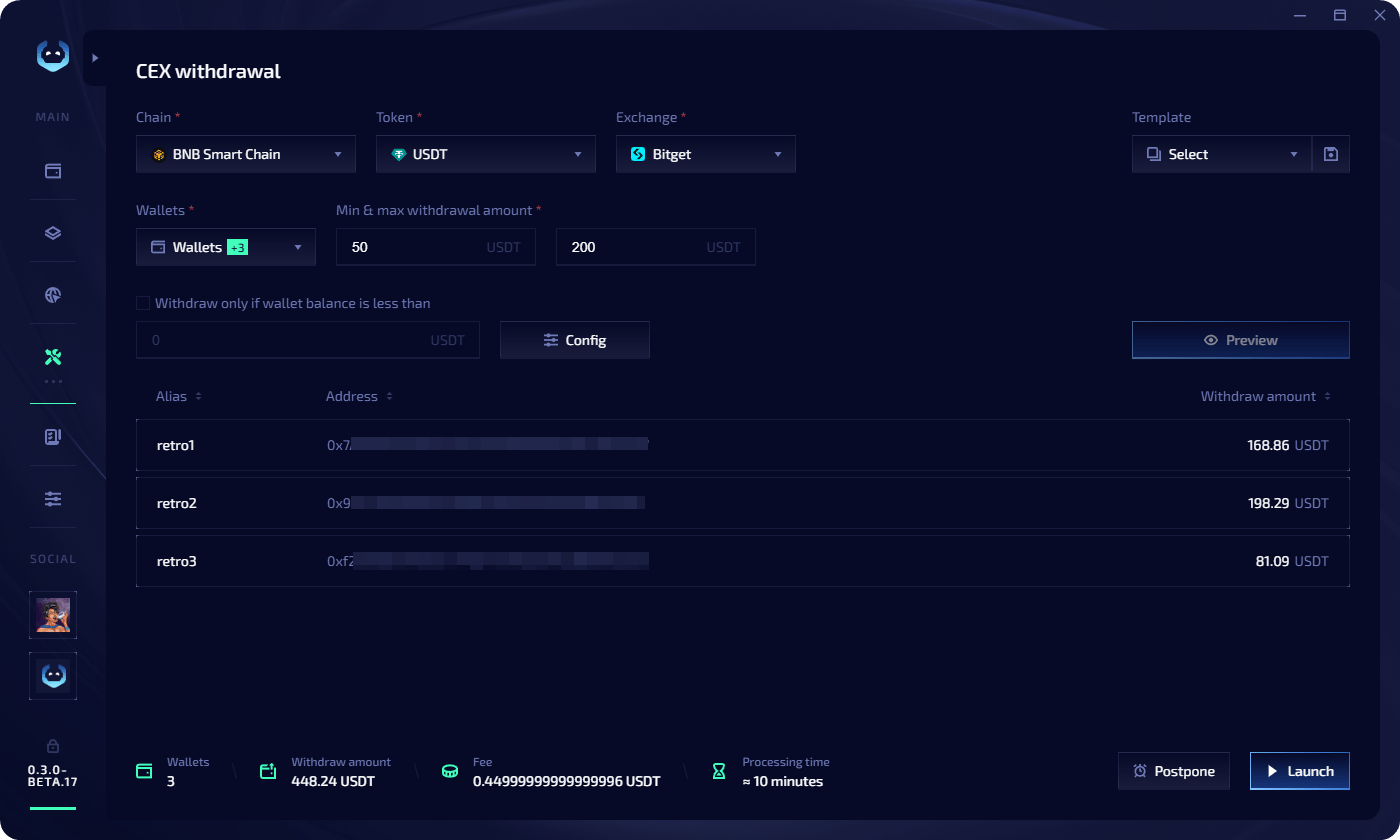 * Click **Launch** to execute immediately
* Click **Postpone** to pick a date and time — the task goes to the [Task Manager](/task-manager/about-task-manager) **Scheduled** tab
## Templates
Save your withdrawal configuration for quick reuse:
* **Save during preview** — click the **save icon** near the templates field at the top of the preview screen
* **Copy from completed task** — in the Task Manager, click the **copy icon** on a completed task. Three options: use as template, copy all wallets, or copy wallets with errors
* Click **Launch** to execute immediately
* Click **Postpone** to pick a date and time — the task goes to the [Task Manager](/task-manager/about-task-manager) **Scheduled** tab
## Templates
Save your withdrawal configuration for quick reuse:
* **Save during preview** — click the **save icon** near the templates field at the top of the preview screen
* **Copy from completed task** — in the Task Manager, click the **copy icon** on a completed task. Three options: use as template, copy all wallets, or copy wallets with errors