> ## Documentation Index
> Fetch the complete documentation index at: https://atmos.oxygen.wiki/llms.txt
> Use this file to discover all available pages before exploring further.
# About wallet manager
> Central hub for managing hundreds of crypto wallets — balances, tags, filters, and bulk operations
## What is the wallet manager
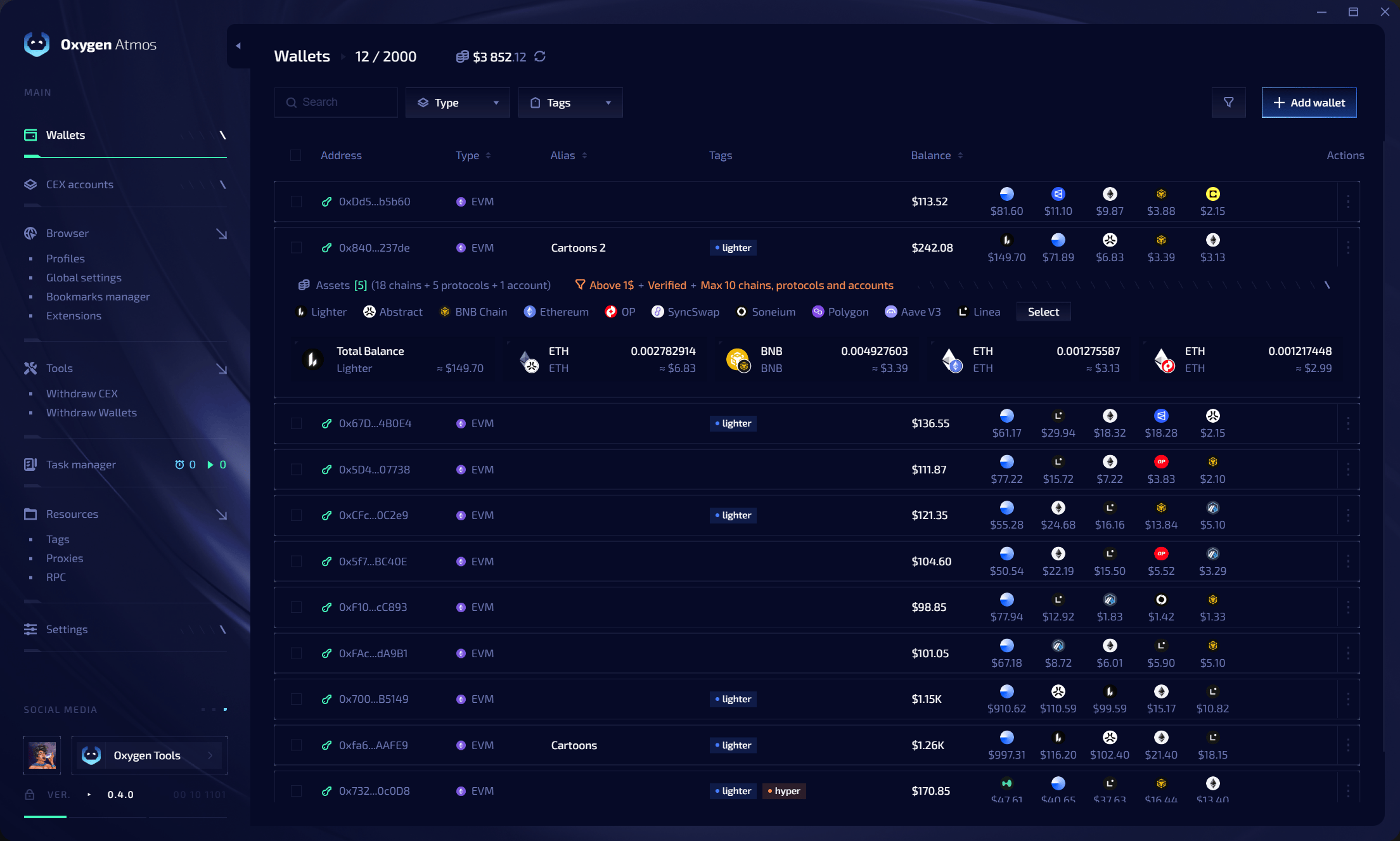
The wallet manager is the core module of Oxygen Atmos. Every workflow starts here — importing wallets, tracking balances, organizing with tags, and preparing wallets for transfers or browser profile creation.
 ## Key capabilities
| Feature | Description |
| ----------------------- | -------------------------------------------------------------------------------------------------- |
| **Balance tracking** | Portfolio balance across all imported wallets with wallet count and limit display (e.g. "5 / 500") |
| **Bulk management** | Import, edit, and tag hundreds of wallets at once |
| **Flexible import** | Add wallets one by one, as a list, or from CSV/XLS/XLSX files |
| **Tag system** | [Unified tags](/resources/tags) shared between wallets, browser profiles, accounts, and extensions |
| **Filters and sorting** | Quickly find wallets by tag, alias, balance, or type |
Wallets can be imported using either a **private key** (full control) or a **public address** (balance monitoring only).
## How it works
Wallets imported into the manager store their data locally on your machine. All sensitive data — private keys, API keys, and settings — is encrypted and never sent to external servers.
From the wallet manager you can:
* Track balances across all wallets in one view
* Create browser profiles linked to specific wallets
* Organize wallets with [tags](/resources/tags) and bulk operations (select, copy, delete)
## Quick links
Add wallets by private key, list, or file upload.
Update withdrawal addresses, aliases, and tags.
Unified tag system for wallets and profiles.
Find and sort wallets by any criteria.
## Key capabilities
| Feature | Description |
| ----------------------- | -------------------------------------------------------------------------------------------------- |
| **Balance tracking** | Portfolio balance across all imported wallets with wallet count and limit display (e.g. "5 / 500") |
| **Bulk management** | Import, edit, and tag hundreds of wallets at once |
| **Flexible import** | Add wallets one by one, as a list, or from CSV/XLS/XLSX files |
| **Tag system** | [Unified tags](/resources/tags) shared between wallets, browser profiles, accounts, and extensions |
| **Filters and sorting** | Quickly find wallets by tag, alias, balance, or type |
Wallets can be imported using either a **private key** (full control) or a **public address** (balance monitoring only).
## How it works
Wallets imported into the manager store their data locally on your machine. All sensitive data — private keys, API keys, and settings — is encrypted and never sent to external servers.
From the wallet manager you can:
* Track balances across all wallets in one view
* Create browser profiles linked to specific wallets
* Organize wallets with [tags](/resources/tags) and bulk operations (select, copy, delete)
## Quick links
Add wallets by private key, list, or file upload.
Update withdrawal addresses, aliases, and tags.
Unified tag system for wallets and profiles.
Find and sort wallets by any criteria.